
 fCare Plus · by NITCO since 1990
Accounting & financial management for healthcare From daily operations to financial statements
fCare Plus is a web-based accounting system for healthcare providers, clinics, and pharmacy groups: general ledger, cost centres, vouchers, vendor payments, fixed assets, budgets, VAT, and e-invoicing. It generates journals automatically from iCare Plus and the clinic system, so sales, purchases, insurance revenue, and taxes reach the books without re-keying.
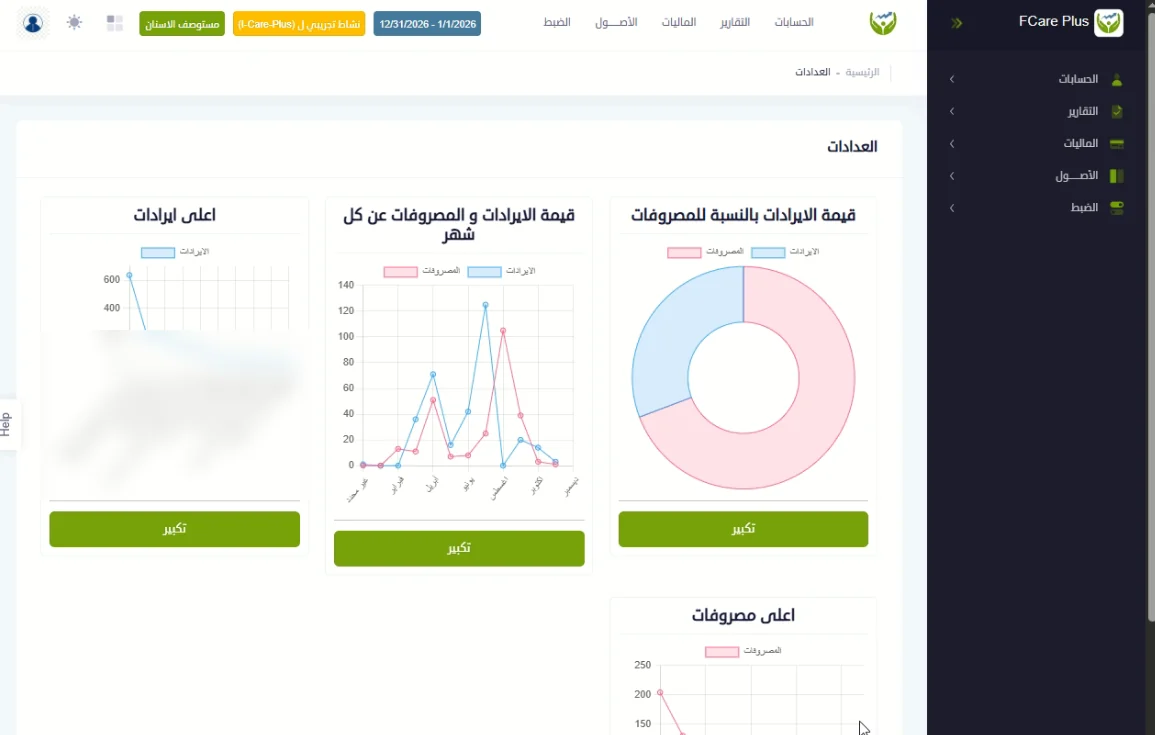
fCare Plus in brief
- Multi-level chart of accounts, with cost centres, sellers, and activities as analysis dimensions
- Manual journals plus automatic journals from iCare Plus and the clinic system, reviewed before posting
- Receipt and payment vouchers with cheque, bank, attachments, and amounts in Arabic words
- Vendor payments: settle one or several invoices in one step
- Fixed assets: register, automatic monthly depreciation, disposal, and barcode labels
- VAT reports by ZATCA category and tax invoices with QR codes
- Financial years and periods with open/close, approval levels, and posting rights
- Audit log with old and new values for every change
Accounting the way healthcare works
Complexes & clinics
Income per doctor, clinic, and cost centre, plus deferred insurance revenue and its aging.
Pharmacies & groups
Sales, purchases, cost of sales, and VAT journals arrive daily from iCare Plus.
Multi-branch groups
Organization, branches, and activities, with reports per branch or for the group.
Finance management
Financial statements, budgets, and a faster monthly close.
Everything your finance team needs
Chart of accounts
Multi-level tree with optional automatic numbering, a budget per account, and mapping to financial statement lines.
Cost centres & activities
Analyse revenue and expense by department, clinic, or branch, by seller, and separate pharmacy from clinic.
Journal entries
Manual entries with cost centre, seller, cheque, and attachments, plus posted, non-posted, and unbalanced lists.
Automatic journals
From iCare Plus and clinics: cash, credit, and insurance sales, purchases, tax invoices, and patient covenants.
Cash, banks & vouchers
Receipt and payment vouchers with cheque, due date, beneficiary, and attachments.
Vendor payments
Outstanding invoices per vendor, pay several in one step, and payment history.
Fixed assets
Asset register and categories, automatic monthly depreciation, disposal, and barcode labels.
Tax & invoicing
Tax invoices and notes with QR codes, and reports by ZATCA VAT return category.
ZATCASettings & permissions
Financial years and periods, opening balances and year-end carry forward, and about 50 settings.
From operation to journal, without re-keying
Daily cash sales
From iCare Plus and the clinic, by payment method and service category.
iCare · ClinicCredit & insurance sales
Daily or monthly, with the insurer receivable.
iCare · ClinicInventory sales
Income, cost of sales, and VAT.
iCare PlusInventory purchases
Purchase invoices by vendor, store, and category.
iCare PlusTax invoices
Tax invoices and their VAT.
ZATCAPatient covenants
Patient deposits and their adjustments.
Clinic
The accountant picks the journal type and period, reviews the proposed entry, then posts it. Each processed day is recorded so it can never be booked twice. Mapping screens set the account, cost centre, and seller for each store, vendor, payment method, and insurer.
VAT and e-invoicing are part of the daily workflow

ZATCA Fatoora
Tax invoices with a QR code switchable per branch, e-invoice reporting through NITCO's ZATCA integration service, a results dashboard, and re-sending of missing invoices.
VAT return reports
Standard-rated (15%) sales, zero-rated local sales, and sales where the state bears the VAT, with Saudi and non-Saudi patients separated.
Insurance revenue
Deferred insurance sales journals and debt aging for insurer receivables.
Arabic documents
Arabic interface and reports, with amounts written in Arabic words on vouchers.
Real fCare Plus screens
Screenshots from the system, with customer and entity names hidden.
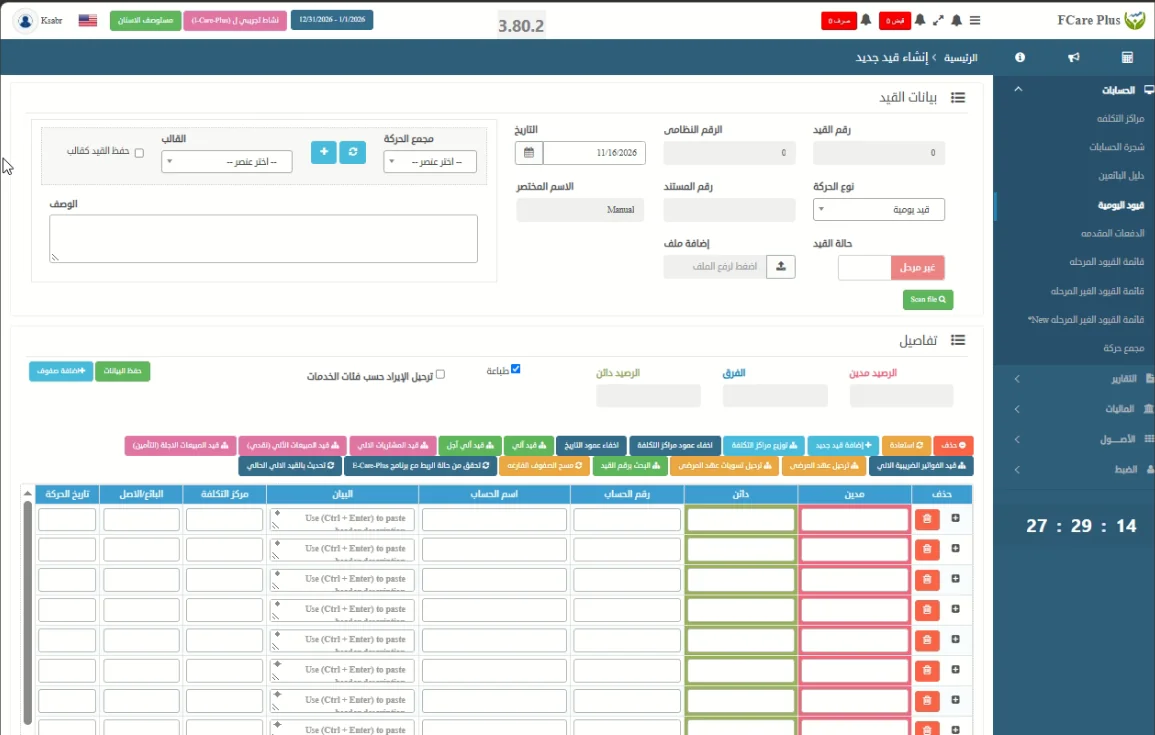
New journal entry
Entries with cost centre, seller, and attachments, plus buttons to generate automatic purchase, cash, credit, and tax invoice journals.
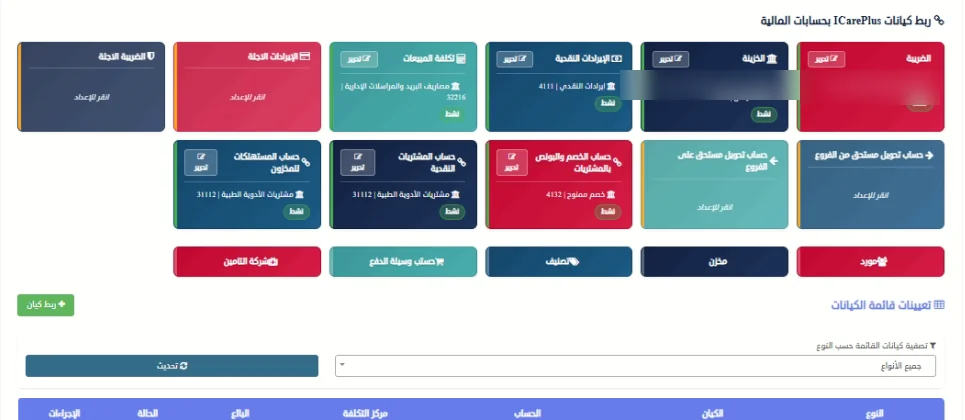
Linking iCare Plus to accounts
Map VAT, cash, revenue, cost of sales, purchases, stores, vendors, and insurers to their accounts.
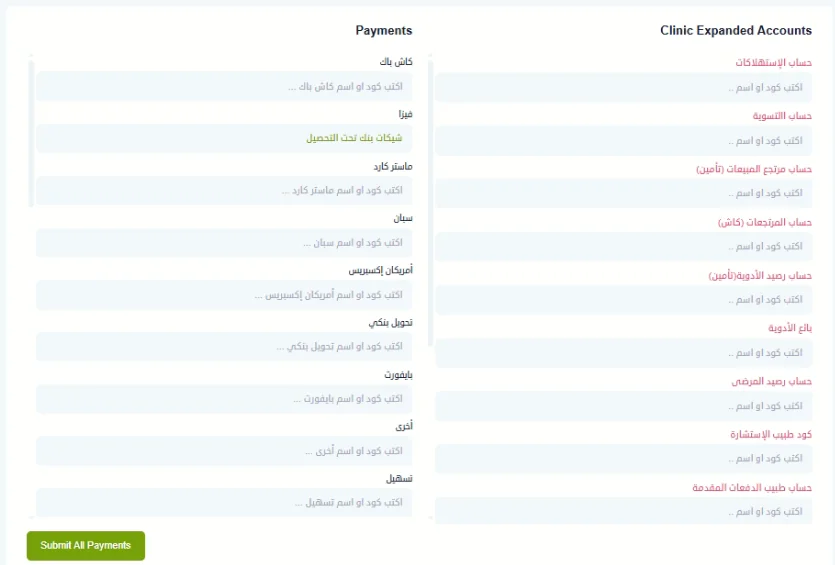
Clinic system linking
Clinic expanded accounts and an account per payment method, so clinic revenue posts automatically.
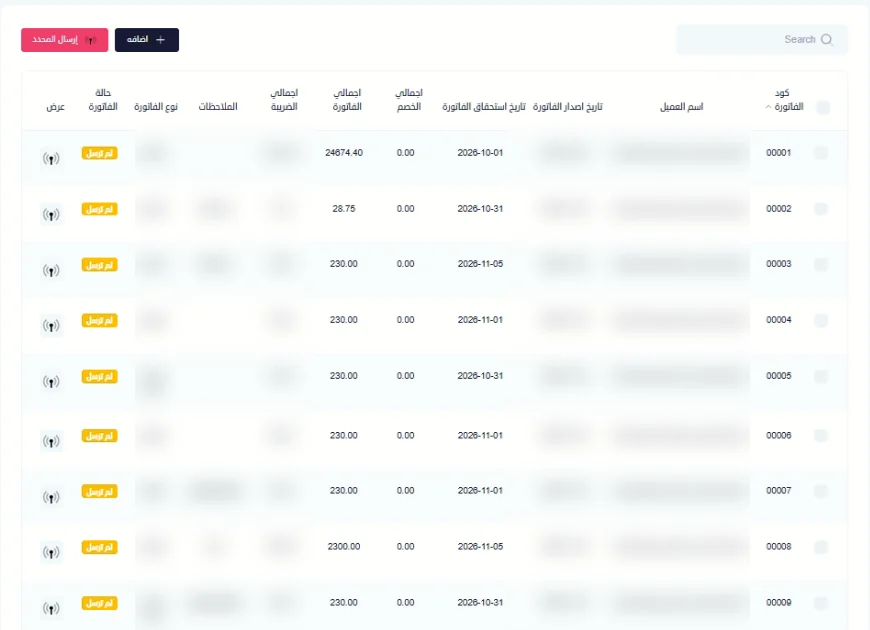
Tax invoices
Invoices, debit notes, and credit notes with sending status, and bulk sending of selected invoices.
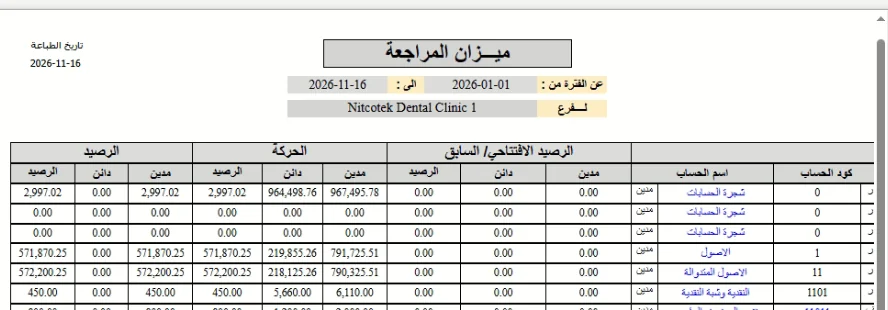
Trial balance
Opening balance, movement, and closing balance, debit and credit, per account for the selected branch and period.
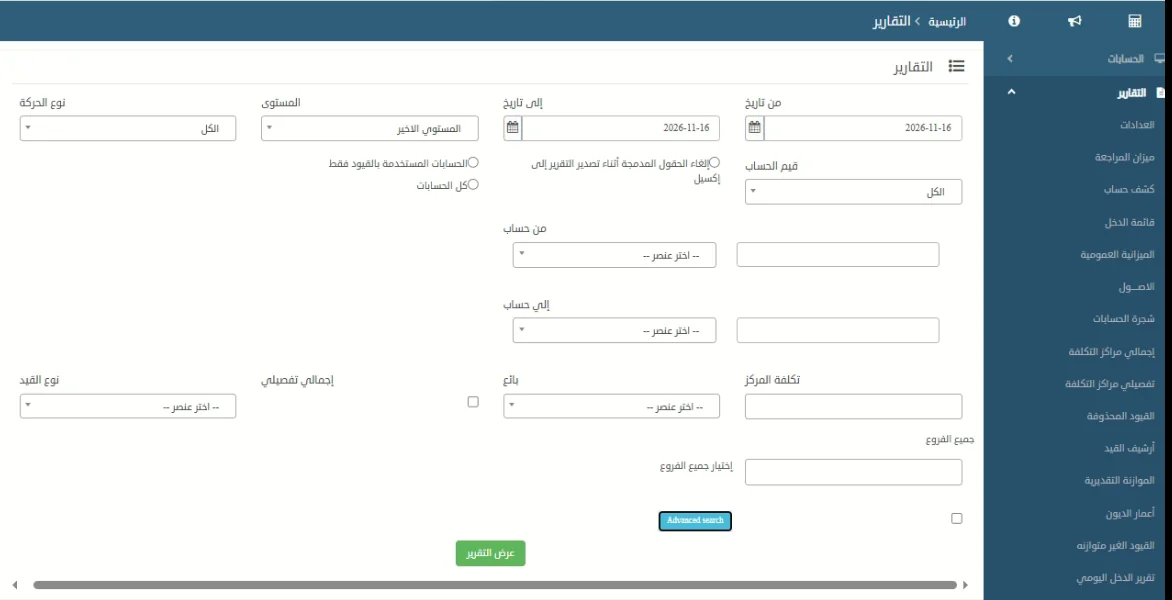
Reports
Account statement, balance sheet, income statement, cost centres, budget, debt aging, and tax reports.
Every entry controlled from organization to document
Who may record it, in which branch, activity, year, and period, whether it needs approval, who may post it, and what happens if it is changed or deleted.
Organization & branch
Own users, branches, and reports; viewing all branches is a separate permission.
Activity
Separates business lines within a branch, with their own settings and approval levels.
Financial year & period
Entries only in an open year and period, with year close and balance lock.
User
Separate rights to create, edit, delete, post, and un-post, plus a backdating limit.
Approvals
An entry cannot be posted until its approvals are complete, unless settings allow it.
Document
Posted entries are read-only; deleted entries keep a reason and can be restored.
Reports that support financial decisions
Financial statements
Balance sheet by level, income statement, cash flow, and trial balance.
Management & analysis
Budget vs. actual, cost centres, income by seller and doctor, and debt aging.
Ledger & control
Account statements, daily movement, journal history, deleted and unbalanced entries, and asset reports.
Tax & compliance
VAT report by return category and details, invoice and note summaries, and ZATCA reporting results.
Questions about fCare Plus
What is fCare Plus?
NITCO's web-based accounting system for healthcare providers, clinics, and pharmacy groups, covering general ledger, cost centres, vouchers, vendor payments, fixed assets, budgets, VAT, and e-invoicing.
Does it integrate with iCare Plus and the clinic system?
Yes. It generates cash, credit, and insurance sales, purchases, tax invoice, and patient covenant journals automatically once stores, vendors, payment methods, and insurers are mapped to accounts.
How does it prevent duplicate automatic journals?
Each processed day is recorded, so the same day cannot be booked twice, and the accountant reviews the proposed entry before posting.
Does it support VAT and e-invoicing?
Yes. VAT reports are grouped by ZATCA return categories, tax invoices carry a QR code, and invoices are reported through NITCO's ZATCA integration service with a results dashboard.
How are journal entries controlled?
Through separate rights to create, post, and un-post, approval levels per activity, year and period locks, and an audit log with old and new values for every change.
Does it support multiple branches and activities?
Yes. Each user works within an organization, branch, activity, and financial year, with income reports per branch; viewing all branches is a separate permission.
Is it cloud or on-premise?
It is web-based and runs in the browser with no installation, hosted on-premise or in the cloud.
See fCare Plus on your own chart of accounts
A live demo with your chart of accounts and a sample month of iCare Plus transactions, with the NITCO team.
No commitment · Reply within one hour